MangaNest:QToon Lite & Comic
- 4.6
- Rating
- 100.00K
- Installs
- Free
- Price

 Analysis by App-foxy
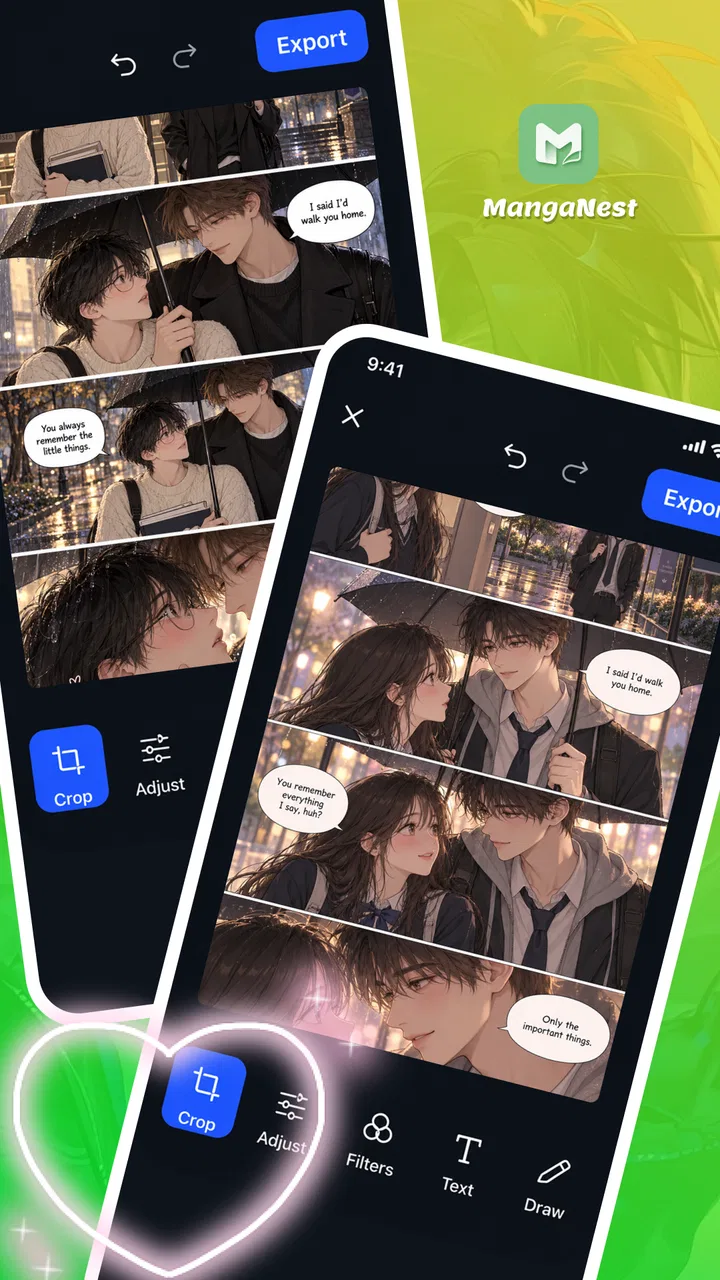
Some photo-editing apps feel like a toolbox that happens to include a few comic effects. MangaNest takes a more focused route: it is a free photo editor for making manga-inspired creations, with cropping, filters, text, and drawing at the center of the experience. I like that clear purpose. Rather than asking you to learn a sprawling creative suite, it points you toward a simple goal: start with an image, shape its look, add your own marks or words, and end up with something that feels more like a comic panel than an ordinary snapshot.
From an ordinary photo to a manga-style idea
The easiest way to approach MangaNest is to think in terms of a small creative workflow. You begin with a photo that has potential: a character portrait, a pet doing something dramatic, or a scene that could use a little visual storytelling. From there, the app’s editing tools give you several straightforward ways to change the image. Cropping helps establish what the viewer should notice, filters provide a different visual mood, and text or drawing lets you add a personal layer.
That combination makes the app approachable even if you do not think of yourself as an illustrator. You can begin with a picture you already have and build on it instead of facing a blank page. For a quick experiment, a crop and a filter may be enough to make the image feel more intentional. If you want a stronger comic sensibility, you can continue by adding text or drawing directly into the composition. The workflow leaves room for both casual edits and more deliberate creative choices.
You May Also Like

 AccuWeather: Weather Radar
AccuWeather Review: A Quick, Clear Forecast for Everyday Decisions
For everyday plans, the best forecast is the one you can understand quickly. AccuWeather makes rain timing, radar, and local conditions easy to act on, with a few trade-offs.

 Hill Climb Racing
Why Hill Climb Racing Still Turns Crashes Into One More Run
A tiny car, a bumpy hill and one more upgrade: Hill Climb Racing keeps resurfacing because its simple chaos makes every near-miss feel personal.

 AliExpress - Shopping App
AliExpress Makes Global Shopping Feel Personal, but Shoppers Bear the Risk
AliExpress turns a global marketplace into a pocket-sized discovery engine. Its reach is useful, its shopping loop compelling, and its trade-offs easy to miss.

 Lords Mobile: Kingdom Wars
Lords Mobile Is a Kingdom-Building Routine, Not a Quick Match
A case-by-case verdict on the building, battles, device demands, and social commitments that make Lords Mobile rewarding for some players and exhausting for others.

 PDF Scanner app - TapScanner
TapScanner Makes Paperwork Easier to Capture, Check, and Share
TapScanner makes scanning with a phone feel less like a rescue operation and more like a dependable step in getting work done. Its capture tools are useful, though not flawless.

 Block Blast!
 Shows How Much a Puzzle Game Can Leave Out
A quiet grid game shows why puzzle players increasingly value instant clarity, repeatable skill and low-pressure play—and where the genre still needs to catch up.
More From Our News Desk
View All News


Choosing and framing the starting image
Cropping is a useful first step because it changes the story before you add any decoration. A wide photo can become a tighter character portrait; a busy background can be trimmed away so the subject stands out. I’d treat this stage as a chance to decide where the viewer’s attention should go, rather than simply removing whatever happens to be near the edges. A thoughtful crop can make even a familiar photo feel newly composed.
The starting image also sets the limits of the finished piece. A clear subject gives you something easy to emphasize, while a cluttered image may need more careful framing. That is not a special requirement of this app so much as a basic reality of editing: the result depends partly on what you bring in. MangaNest’s crop tool gives you a practical way to improve that starting point before moving into the more expressive parts of the process.
Using filters to set the mood
Once the framing feels right, filters offer a quick way to shift the image’s character. They can help move a photo toward a more stylized look and make the overall result feel less like an untouched camera image. I’d experiment with the visual direction before adding text or drawn details, since a filter can change the tone of the whole composition. A playful image may call for a different treatment than a dramatic portrait, and choosing that mood early gives the later steps a clearer purpose.
The key is to use a filter as part of the composition, not as an automatic substitute for one. A strong effect can draw attention, but it can also compete with a face, a caption, or a hand-drawn accent. I find it helpful to pause after applying a look and ask whether the subject is still easy to read. The app’s appeal is that it gives you accessible creative tools; getting a polished outcome still comes down to making choices that work together.
Adding words and personal marks
Text is where an edited image can start to behave like a comic moment. A short line can suggest a reaction, provide context, or give a character a voice. Instead of filling the image with a long caption, I’d keep the wording brief enough to read at a glance. That helps the image remain the main event and gives the text a clear role in the scene.
Drawing brings a more personal touch. You might use it to add emphasis or simply make the image feel less mechanically edited. The combination of text and drawing is especially useful when you want the finished piece to communicate a small idea rather than just present a filtered photo. These tools do not require you to start as an experienced comic artist; they offer a way to experiment with visual storytelling using an image you already know.
Keeping the workflow connected
A good editing sequence is less about using every available tool and more about moving smoothly from one decision to the next. I’d start by selecting the image and setting its framing, then try a filter, and only afterward decide whether the composition needs text or drawing. That order helps avoid spending time on details that a later crop might remove. It also makes it easier to judge whether each addition improves the overall image.
The handoffs between stages are where a simple editor can either feel inviting or become fussy. Here, the tools point toward a recognizable chain of actions: frame the photo, change its appearance, and add expressive details. That is a sensible structure for someone who wants to make a quick manga-inspired edit without turning the project into a technical exercise. The creative challenge is mainly deciding what to emphasize, not learning an elaborate production process.
From edit to finished creation
The outcome can be as modest as a stylized portrait or as expressive as a small comic-like scene. What matters is that the photo, visual treatment, and added marks feel as if they belong together. I’d review the result at the end with fresh eyes: does the subject stand out, is any text easy to follow, and do the drawn details support the image rather than distract from it? A couple of small adjustments can make a piece feel much more deliberate.
Because the core tools are familiar, MangaNest is suited to quick creative sessions as well as casual experimentation. You do not need to map out a complicated project before opening it. A photo can provide the starting point, and the editing steps can suggest what to do next. For social posts, personal projects, or simply trying out a new visual idea, that low-friction approach is part of the attraction.
Where the process can feel limiting
The workflow is focused, and that focus is both the app’s strength and a boundary. Its described toolkit centers on cropping, filters, text, and drawing, so the experience is best understood as a photo editor for comic-inspired results rather than a full illustration or page-layout environment. If your idea depends on building an entire comic from scratch, you may want a different kind of creative tool. If you already have a photo and want to give it a manga-flavored treatment, the available approach makes more sense.
There is also a practical point worth keeping in mind: a tool can make editing easier, but it cannot decide the composition for you. A filter may not suit every image, text can crowd a small subject, and drawing details can become distracting if they have no clear purpose. Those are ordinary creative trade-offs rather than reasons to avoid the app. The best results are likely to come from using only the steps that help your particular image.
A quick profile of the app
MangaNest is a comics-focused app from Quanettema, and it is free to use. It has a Teen content rating and requires Android 7.0 or later. The current version is 1.6.21, and it was released on June 16, 2026. The app has reached over one hundred thousand installs, with an average rating of 4.6 from around 3,700 ratings. Those figures suggest that it has found an audience among people interested in making manga-inspired edits, while the small number of written reviews means the overall score is best treated as a general signal rather than a detailed account of everyone’s experience.
For searchers comparing comic photo editors, the central question is simple: do you want to transform an existing photo, or create artwork from a blank canvas? MangaNest is aimed at the first kind of project. Its mix of cropping, filters, text, and drawing gives you a compact path from source image to personalized result. That makes it a sensible option for newcomers who want to try manga-style photo editing without beginning with a complex set of illustration tools.
My take after following the workflow
I like the way the app’s purpose stays easy to understand from beginning to end. Start with a photo, improve its framing, find a visual mood, and add words or drawn details only if they help. That sequence feels practical, and it gives the user control over how far to take an edit. You can keep things minimal or lean further into the comic-inspired idea, depending on the image and your patience.
The best reason to try MangaNest is its direct route from photo to personal, manga-inspired creation. It is not trying to be every kind of art app at once, which makes its role easier to judge. If you want a straightforward way to crop, stylize, caption, and draw on photos, it is worth exploring. If your plans call for extensive illustration or a full comic-making workspace, its focused editing flow may not cover the whole project. For everyday creative experiments, though, the journey from ordinary image to expressive edit is clear, approachable, and enjoyable.
FAQs for MangaNest:QToon Lite & Comic
01What is MangaNest: QToon Lite & Comic?
MangaNest: QToon Lite & Comic is a mobile reading app for people who enjoy manga, webtoons, and other comic-style stories. It brings illustrated series together in a browsing and reading experience, so you can explore available titles and follow stories on your phone. The exact selection, features, and availability can vary by app version and region, so check the current listing and in-app details before downloading.
02Is MangaNest: QToon Lite & Comic free to use?
The app may be available to download without an upfront purchase, but that does not necessarily mean every feature or title is free. Reading access can depend on the app’s current policies, and there may be advertisements, optional purchases, or other restrictions. Review the store listing and any payment information shown in the app before subscribing or buying anything, especially if you plan to use it regularly.
03How can I find and read comics in MangaNest: QToon Lite & Comic?
You can generally start by browsing the titles presented in the app and opening a series that interests you. Comic readers typically let you move through illustrated pages or panels using on-screen gestures or controls, though the exact layout can differ between titles and versions. If you cannot find a particular comic, it may not be included in the available catalog or may be unavailable in your region.
04Can I read MangaNest: QToon Lite & Comic offline?
Offline reading depends on whether the app provides a download or save feature and whether that feature is available for the comic you want. Do not assume that a title can be read without an internet connection just because it appears in your library. Check the app’s controls and help information, and test any download option while connected to Wi-Fi before relying on it during travel or elsewhere without reliable internet.
05Is MangaNest: QToon Lite & Comic suitable for children, and what should I check before installing it?
Comic catalogs can include stories with different themes and age suitability, so the app should not automatically be treated as appropriate for every child. Check the age rating, content descriptions, privacy information, and requested permissions on the app-store page before installing. Parents should also review the available titles and any account, advertising, or purchase controls in the app, since these details may change over time.
Pros
- A lightweight design can work well on phones with limited storage.
- A broad range of comics gives readers plenty of options to explore.
- Chapter-based reading makes it easy to follow a series over time.
- The mobile-friendly format is convenient for reading on the go.
- A free entry point lets users try the app before spending money.
Cons
- Some titles may have incomplete or irregularly updated chapters.
- Reading options may vary depending on the comic or source.
- Ads can interrupt reading or make navigation less comfortable.
- The catalog may include translations with uneven wording.
- Content availability can differ by region or change without notice.

MangaNest:QToon Lite & Comic
Gallery